Purpose-built filmmaking specialists
Role-specific guidance for story, worldbuilding, camera, continuity, scoring and finishing—shaped around a professional production workflow.
 CLOSED BETA / 30 SEATS
Directed by you.
Specialist AI agents developed by NOD3 for filmmaking. Built around our production workflow, with dedicated roles, creative guidance and production checks. A Film Director leads 16 specialists. Directed by you.

Windows 10/11 x64 · Your own Codex account · Current build rc.6
Closed beta application
Applications are reviewed by NOD3. Submitting a form does not reserve a seat. Approved accounts can download the installer, read the guide and send feedback here.
Sign in to apply using your account email.
Sign in with ChatGPTThe beta runs locally inside Codex. Media-provider accounts and generation credits are separate.
Privacy ↗NOD3 / WHAT'S INSIDE
More than a collection of prompts. A coordinated crew with defined responsibilities, shared project records and a filmmaking workflow developed by NOD3.
Role-specific guidance for story, worldbuilding, camera, continuity, scoring and finishing—shaped around a professional production workflow.
Review story logic, blocking, screen direction and continuity before advancing. Inspect generated assets and actual edit joins as production progresses.
Prepare clear handoffs and run supported production through your connected tools. Generation budgets, creative approvals and release decisions stay with you.

Specialist handoffs, coordinated by your Film Director.
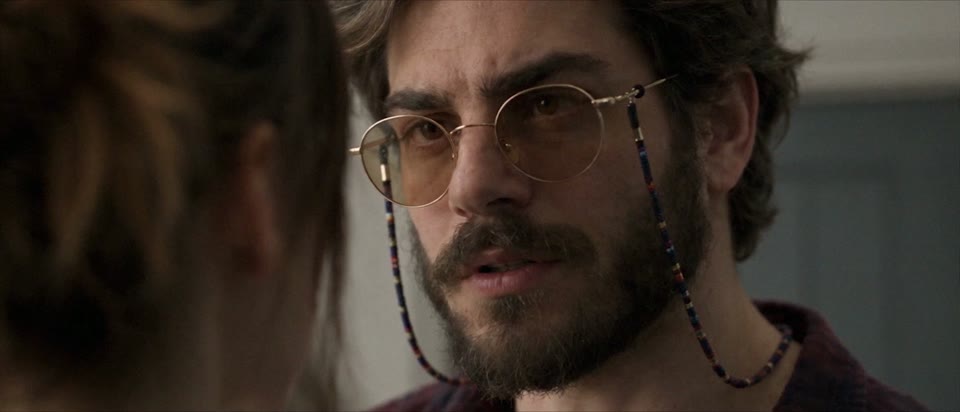 E L L A / SAMPLE FRAME
Illustrative workflow. No live project or connected session is shown.

Pair your crew with Dreamina for a connected canvas workflow. Already using another platform? Keep your tools—supported automation needs that platform’s compatible tools or a custom integration.
Start with your story. Connect generation when you are ready. Dreamina access, account and credits are separate; check its current requirements.NOD3 / SAMPLE FILMS
A showcase of NOD3 filmmaking projects using our Specialist AI agents. Play the first sample here; the next film is in production.
02:40 · Sample film
In the making
Made for your format
The filmmaking workflow stays connected. The creative choices adapt to the film you want to make.
AI films
Develop character arcs, visual language, performance beats and a musical identity. Plan the coverage, then review generated shots and the cut against the same story.
Treatment → Worldbuilding → Screen Play → PrevisShorts
Focus the idea, opening and payoff for short-form viewing. Keep action readable, framing purposeful and dialogue or captions clear within the selected format.
Hook → Visual beats → Payoff → Final cutVertical drama
Develop episodic character choices, conflict and earned cliffhangers. Plan vertical framing, eyelines and continuity so recurring characters and locations hold together.
Series world → Episode beats → 9:16 shot planningProduction uses your connected tools and approved scope. Examples describe creative support, not a promise of one-click rendered films.
Meet the specialists
One main Film Director. Sixteen specialist roles. A team designed to work toward the same film.

Your creative partner and the team lead. Holds the brief, brings in the right specialists, weighs their recommendations and keeps decisions aligned across the project. You approve the creative direction, production spend and release.

Keeps the work moving: scope, schedule, budget assumptions, versions and handoffs. Helps you see the next practical step.

Studies your references for story, pacing, framing and sound. Turns useful observations into creative directions and concrete checks.

Develops treatment, logline, synopsis, character choices and scripts with you. Adapts dialogue and story beats to the intended format.

Checks motivation, cause and effect, reveals and payoff. Helps a short scene land, or an episode earn its next turn.
Maps blocking, geography and shot order in rough boards before cinematic generation. Makes the plan readable before you spend on shots.

Designs framing, light, camera movement and visual attention. Keeps camera-side choices, eyelines and screen direction intentional.

Builds the physical story world: locations, wardrobe, props and design rules. Aligns character sheets and environments across scenes.

Independently checks space, action, identity, wardrobe and props. Flags screen-direction conflicts and mismatches between actual shot boundaries.
Develops character, environment and shot stills within your approved image scope. Checks composition, materials and reference consistency.

Runs approved video jobs through your connected tools. Tracks job status, references, output versions and bounded repairs against your spending limits.

Shapes available footage into a cut and checks pacing, joins, exports and delivery specs. Separates what was inspected from what still needs review.

Starts musical identity during Worldbuilding: themes, motifs, instruments and silence. Arranges cues to the actual Rough cut and follows the score through final cut.

Plans dialogue, ambience, foley and effects, then integrates the approved score. Helps dialogue, music and sound share the same dramatic space.
Develops the approved grade and checks matching between shots. Protects skin, materials, exposure and the intended look during finishing.
Tracks source, licence and consent evidence for music, voices, likenesses and visual assets. Surfaces unresolved rights questions before delivery.

Prepares release plans, submission materials and launch drafts for your chosen destination. Actual publishing and submission stay subject to your approval.



NOD3 / HUMAN CRAFT
Developed around NOD3’s filmmaking workflow: specialist responsibilities, creative handoffs and checks that keep the story, shots and finish working together.
Before installation
Requirements for the rc.6 Windows local beta.
64-bit x64 PC with built-in Windows tar.exe. ARM64 is configured but not hardware-tested.
Install the desktop app for chat and use your own account. NOD3’s installer can prepare the CLI; it does not install the desktop app.
Compatible Node.js 22+ and npm are reused. If missing, Install.cmd downloads a verified private runtime and prepares the Codex CLI as needed.
Internet for prerequisite downloads, sign-in and online AI tools. Keep space for the runtime, your project assets and exports.
RAM, GPU and free-space thresholds have not been benchmarked for this beta. Your video editor and generation providers have their own requirements. Provider accounts and media credits are separate.
Setup in four steps
Once approved, download rc.6 from your portal. Extract the entire ZIP to a new folder.
Double-click the installer. It prepares missing components, the team and NOD3 MCP. No administrator required.
Reuse your login or complete the official Codex sign-in flow. Your account stays yours.
Reopen Codex, type Run NOD3, share your brief and choose a project folder when asked.
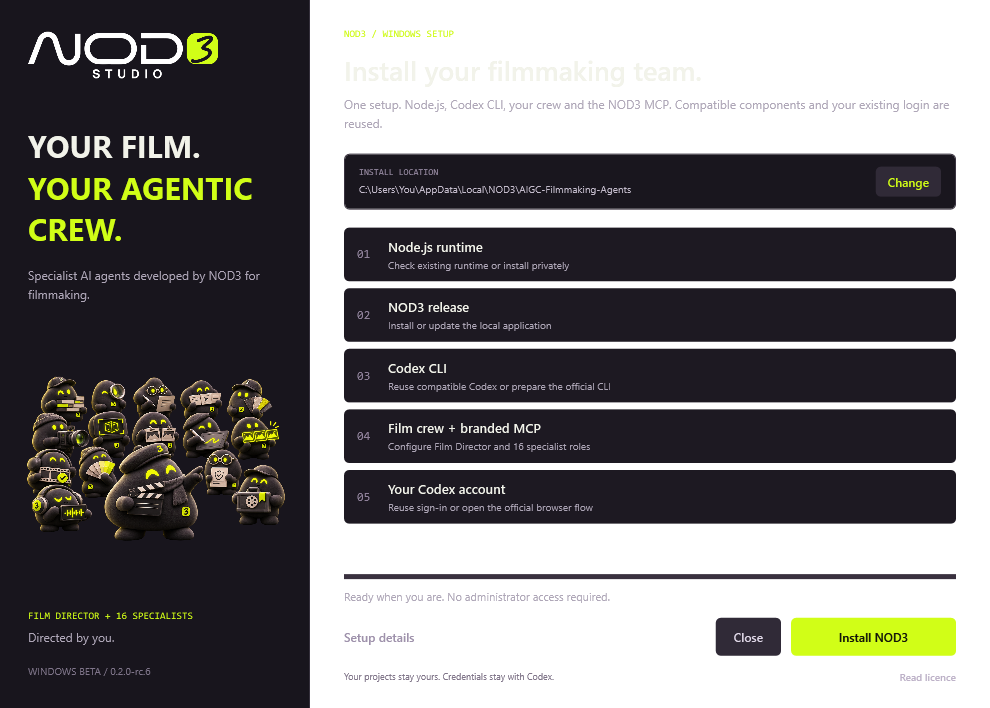
Updating? Extract the newer trusted release into a new folder, run Install.cmd again and reopen Codex. Your project records, progress and login remain.
When something stops
Start with the exact message and the last action. These checks cover the common setup and access situations.
Close Codex completely and reopen it after installing or updating NOD3. An already open chat can retain the previous MCP session.
Extract the whole ZIP first. Keep every file together and run Install.cmd from the extracted folder, not from inside the ZIP.
Check the connection and the download error, then retry Install.cmd. The installer verifies its private Node download before running it.
This beta uses an unsigned script installer. Verify the trusted release source and SHA-256, read the prompt, and follow your organisation’s device policy.
Check that you selected the correct project folder. Report the current stage, expected stage and last action. Keep the project files intact for diagnosis.
Sign in with the same account used for the application. A pending application is waiting for review; approved access is required to download.
FAQ
Dreamina Canvas CLI is NOD3’s preferred production companion, not a requirement for planning. It needs its own eligible account, access and credits. Other platforms can be used through compatible tools or a custom integration; available automation depends on that connection. The NOD3 installer does not install or connect Dreamina for you.
NOD3 develops the role instructions, filmmaking workflow, specialist handoffs and production checks in this package. The underlying AI comes from your Codex setup and connected tools.
You make the creative decisions. The main Film Director coordinates the team and brings in the specialists relevant to the current work.
This rc.6 closed beta is exclusively for Codex users on Windows. NOD3 support for Claude and ChatGPT on the web is coming soon and is not included in this beta. Signing in to this beta page does not install NOD3 or sign the local Codex app in for you.
The team helps with development, planning, production and review. Media execution depends on the tools you connect, available features and your approvals. Progress to a stage does not authorise paid generation.
Provider accounts and generation credits are separate. NOD3 does not bundle a local video-generation model. Connect the services you choose for production.
No. Film Director uses the relevant specialists for the task. The package contains 16 specialist roles; availability and execution depend on the host and tools.
English is the fallback. The team follows your conversational language or explicit preference. Script and dialogue language are separate project choices.
Sign in, complete the application and return here to check its status. NOD3 reviews applications. Only approved tester accounts count toward the 30-seat limit; applying does not reserve a seat.
Download a newer trusted release, extract it into a new folder and run Install.cmd. Reopen Codex. Project progress and login are retained; changed managed team files require reconciliation.
Approved testers can submit feedback in the portal. Include the release version, workflow stage, what you expected and what happened. Keep credentials and private client files out of reports.